PhotoCraft ArtCraft AI logoPhotoCraft ArtCraft AI

PhotoCraft ArtCraft.The open-source Photoshop alternative.

A native Rust image editor with layers, masks and real PSD support. Free on Mac, Windows and Linux, with no subscription.

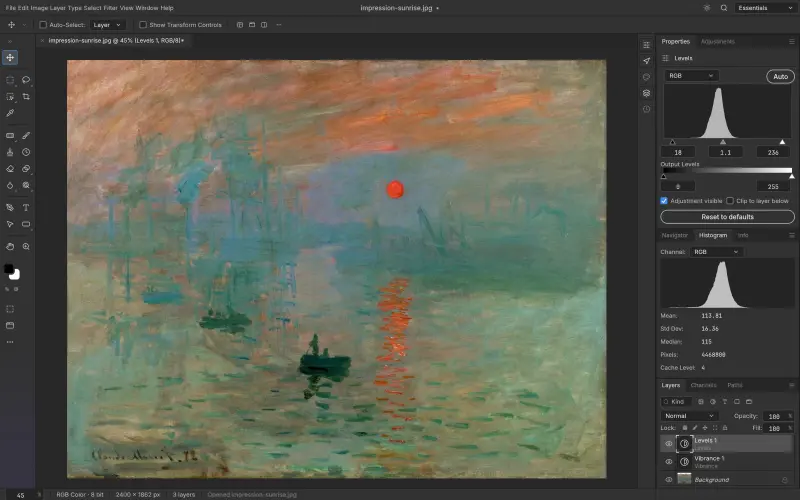
PhotoCraft ArtCraft editing The Great Wave with curves, vibrance and a layer style
GitHub stars
44.1k
editing tools
58
blend modes
27
scriptable commands
500+
price, forever
$0

What is PhotoCraft ArtCraft?

PhotoCraft is the image editor inside ArtCraft, an open-source creative studio built by the team behind Storyteller.ai. When people search for PhotoCraft ArtCraft, they usually want one thing: a free program that opens their PSD files and behaves like Photoshop, without a monthly bill. That is exactly the gap PhotoCraft is built to close.

The project is a clean-room reimplementation written entirely in Rust. Its developers rebuilt Photoshop's workflows from public specifications and observed behavior rather than Adobe code, which is what lets them release it under permissive open-source licenses. The canvas is drawn on your GPU through wgpu, using Metal on macOS, DirectX 12 on Windows and Vulkan on Linux. There is no Electron shell and no browser engine underneath, so it starts quickly and stays responsive on ordinary laptops.

PhotoCraft ArtCraft concentrates on the parts of Photoshop people use every day: layers and groups, pixel and vector masks, clipping masks, adjustment layers, layer styles, smart objects, live type, pen paths and a full brush engine with pen pressure and tilt. Menus, panels and shortcuts sit where Photoshop users expect them, so the learning curve is measured in minutes, not weeks.

It is honest about its stage. PhotoCraft is still an early alpha, and its own documentation says it is not yet a replacement for daily professional work. New builds land every few days, though, and each release closes visible gaps. If you have been waiting for an open-source Photoshop alternative that feels familiar from the first click, this is the most promising one to try today.
Everything you reach for in Photoshop, rebuilt natively

Familiar from the first click

Every Photoshop menu item is wired to a command, and the panels, tools and shortcuts follow the layout your hands already know. Subject selection and Select and Mask run on your own machine.

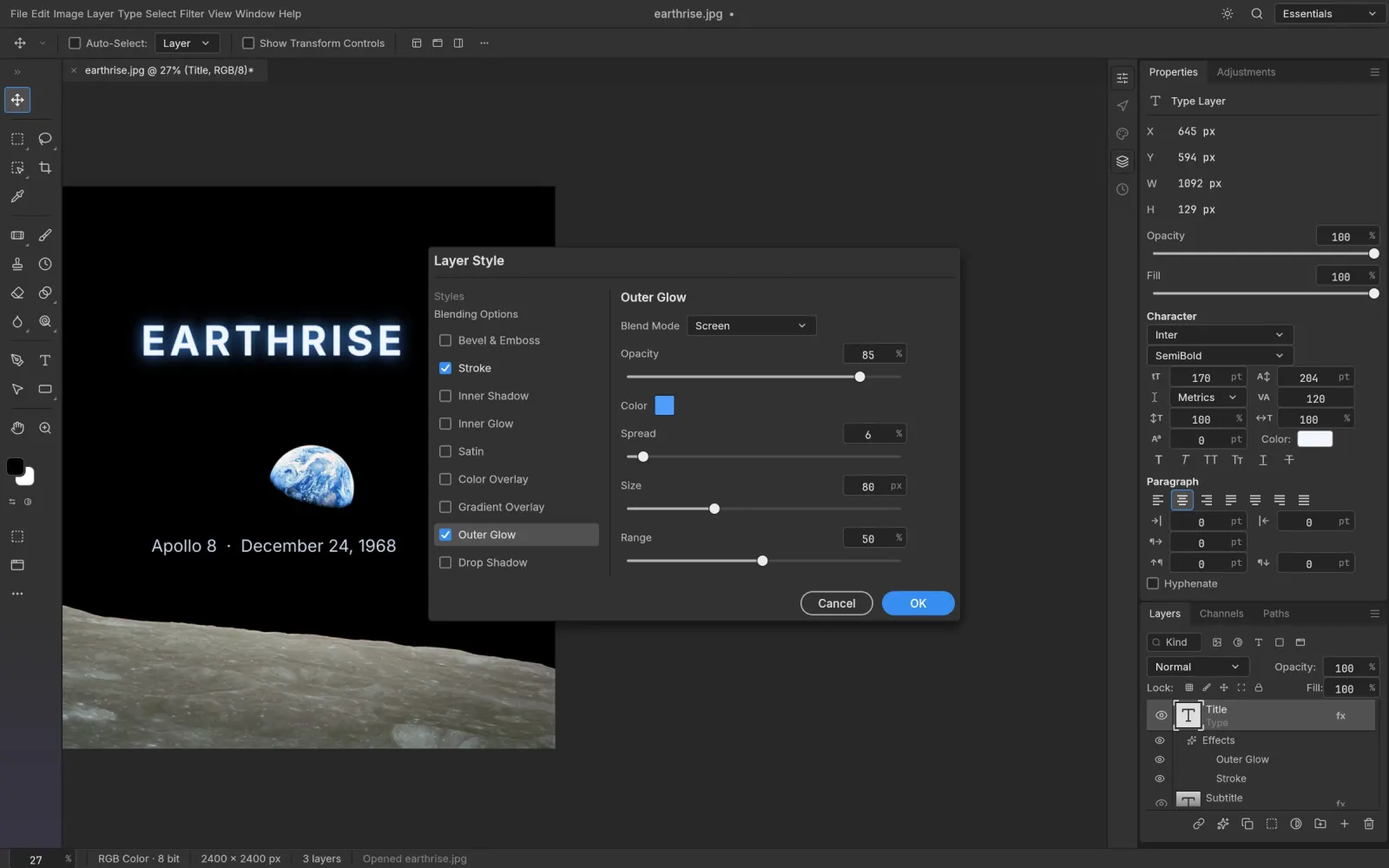
Layer styles on live type
Levels with a live histogram

Non-destructive by default

16 adjustment layers, more than 70 live-preview filters, smart objects with smart filters and a full set of layer styles.

307/309

Real PSD round-trips

Opens and saves layered PSD and PSB. 307 of 309 files in the psd-tools test set re-save with a matching render.

A GPU canvas, not a web view

Composited on Metal, Vulkan, DirectX 12 or WebGPU through wgpu, with a CPU reference renderer behind it.

Metal / Vulkan / DX12 / WebGPU

Color you can trust

8, 16 and 32-bit documents in RGB, CMYK, Lab and Grayscale, with ICC profiles, soft proofing and gamut warning.

Scriptable by people and agents

More than 500 commands are shared by the UI, a headless CLI, a JSON control channel and an MCP server.

$ photocraft-cli mcp

See it in action

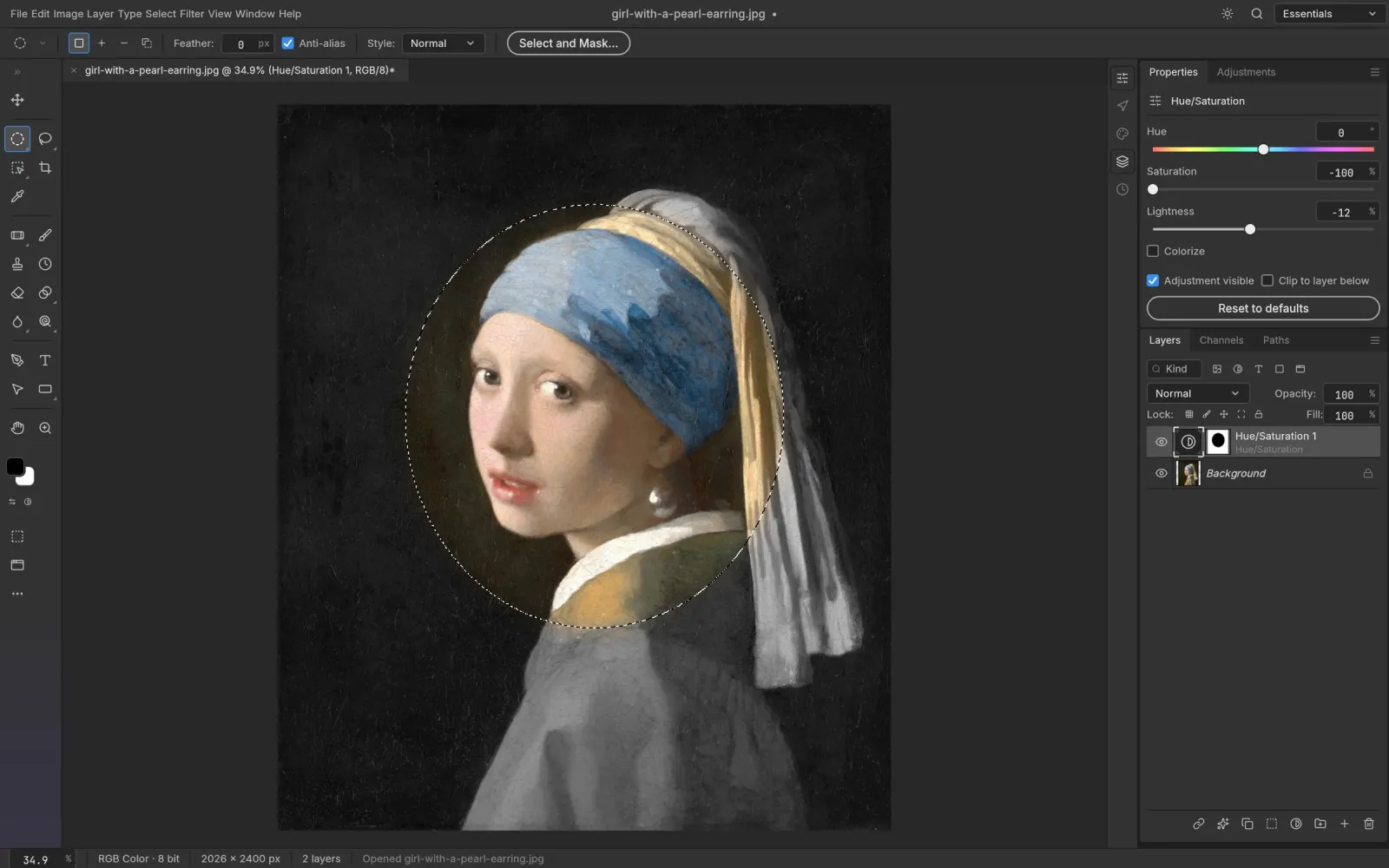
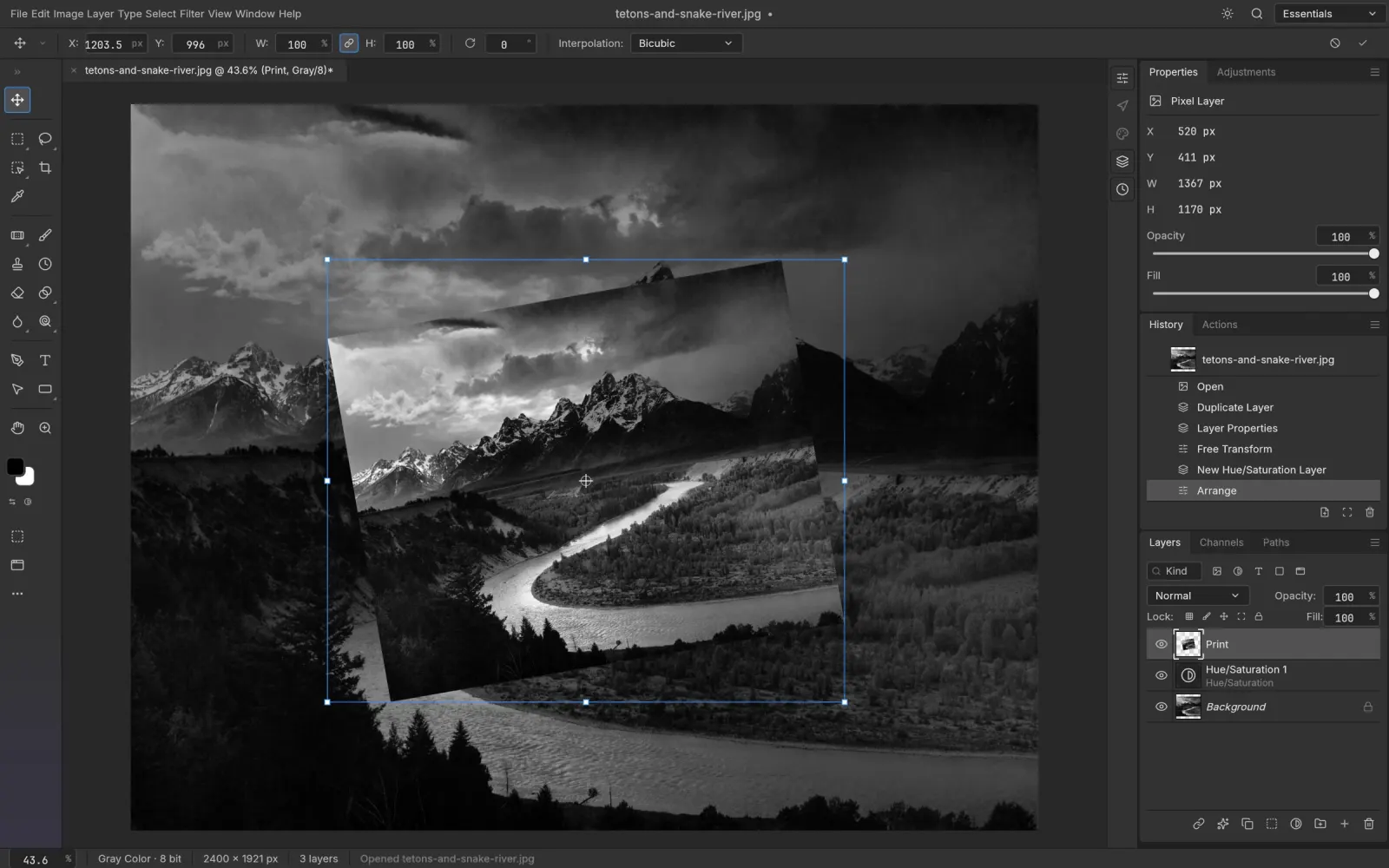
Every frame was captured in PhotoCraft itself, editing public-domain artwork. Pick one to look at adjustments, styles, masks, filters, type and vectors up close.

Selections and masked adjustments

ArtCraft open source

One open-source studio, seven Crafting Apps

ArtCraft began as an open-source studio for controllable AI image and video, with 2D and 3D compositing, character posing and scene blocking for filmmakers and artists. In 2026 the team started rebuilding the classic desktop creative suite in Rust as a family of Crafting Apps. PhotoCraft is the first and most mature of them.

ArtCraft open source means you can read every line of the code, build it yourself and ship modified versions. PhotoCraft is dual-licensed under MIT or Apache-2.0, so commercial use is allowed. The ArtCraft name and logos stay trademarks of the project, which means forks need their own branding.

Every app installs and updates through one ArtCraft Launcher, shares the same command registry and is developed in public on GitHub, where the PhotoCraft repository alone has passed 44,000 stars.

getartcraft.com
  1. PhotoCraftThis site
  2. VectorCraftVector illustration
  3. FilmCraftVideo editing
  4. LightCraftPhoto library and raw developer
  5. PdfCraftPDF workbench
  6. EffectCraftMotion graphics and VFX
  7. DesignCraftPage layout and publishing

Download PhotoCraft ArtCraft

Choose your platform. Every button links straight to the official PhotoCraft releases on GitHub, so you always get the original, unmodified build.

Disk image (Universal)

Apple silicon and Intel Macs.

Download for macOS

photocraft-0.7.0-macos-universal.dmg

Or use the ArtCraft Launcher

One small app (v0.2.0) that installs PhotoCraft and the other Crafting Apps, then keeps them updated.

Build from source

Requires Rust 1.90 or newer. Install it with rustup.rs

git clone https://github.com/storytold/photocraft
cd photocraft
cargo run --release -p photocraft

Install it in about two minutes

Pick your system for the exact steps, plus fixes for the warnings you might see on first launch.

  1. 1
    Download the Universal disk image (.dmg). It runs natively on Apple silicon and Intel Macs.
  2. 2
    Open the .dmg and drag PhotoCraft into your Applications folder.
  3. 3
    Launch it from Applications or Spotlight. If macOS asks about an app downloaded from the internet, click Open.
  4. 4
    Optional: unzip the command-line tool and put photocraft-cli on your PATH for headless batch edits.

If something looks wrong

Drag and drop on Wayland
Not supported yet. Use File, Open, paste from the clipboard, or run under XWayland.
Blank or slow canvas
Update your graphics drivers so Metal, Vulkan or DirectX 12 is available to wgpu.
Verify a download
Compare shasum -a 256 (macOS, Linux) or Get-FileHash (Windows) against SHA256SUMS.txt.
Staying current
Alpha builds ship often. The ArtCraft Launcher updates PhotoCraft for you.

PhotoCraft vs Photoshop

PhotoCraft copies Photoshop's way of working on purpose, but the two are at very different points in their lives. This is how they compare right now.

FeaturePhotoCraftAdobe Photoshop
PriceFree, foreverFrom US$22.99 a month on an annual plan
LicenseOpen source, MIT or Apache-2.0Proprietary, Adobe account required
PlatformsmacOS, Windows, Linux, FreeBSD and the webmacOS, Windows, iPad and the web
Offline useFully offline, no sign-inWorks offline with periodic license check-ins
PSD and PSBRead and write, 307 of 309 test files matchNative format
Layers and masksGroups, clipping masks, smart objects, 27 blend modesThe industry reference
Adjustments and filters16 adjustment layers, 70+ live filtersComplete set, refined over decades
Color8, 16, 32-bit with ICC and soft proofing8, 16, 32-bit with ICC and soft proofing
Generative AINot yet, on-device selection onlyGenerative Fill and Expand with Firefly credits
AutomationCLI, JSON channel and MCP serverActions, UXP and ExtendScript
Plug-insPhotoshop plug-ins are not supportedLarge third-party ecosystem
MaturityEarly alpha with frequent releasesIndustry standard since 1990

PhotoCraft fits if you

  • want Photoshop habits without a subscription
  • work on Linux or FreeBSD, where Photoshop does not run
  • open and adjust PSD files now and then
  • want to script edits or connect an AI agent

Photoshop still fits if you

  • edit images professionally every day
  • depend on Generative Fill or other Firefly tools
  • rely on third-party plug-ins
  • need output that matches Photoshop pixel for pixel

Photoshop price is Adobe's US list price for the single-app annual plan in October 2026. PhotoCraft figures come from the project's documentation.

What it is like to use

A summary of what early testers and reviewers report after real editing sessions with the alpha builds.

PhotoCraft is the most convincing free take on the Photoshop experience so far. Hobbyists, students, Linux users and anyone who only needs Photoshop occasionally should install it today. Professionals can treat it as a promising second tool for now.
Our verdict
First launch
It opens fast and stays responsive, even on a low-power laptop with integrated graphics. No account, no upsell screen, no cloud prompt.
Instantly familiar
Tool placement, menus and shortcuts follow Photoshop more closely than any other look-alike. Most people find their way within minutes.
PSD round-trips
Layered files open with groups, masks, type and styles intact, then save back for colleagues who stay on Photoshop.
Where the alpha shows
It looks closer than it behaves. Some filters render differently from Adobe's, and memory can reach about 5 GB on large PSDs.

What works

  • Free and open source, no subscription or account
  • Photoshop-style interface with almost no relearning
  • Reads and writes layered PSD and PSB
  • Fast GPU rendering on modest hardware

What to expect

  • Early alpha, so bugs and missing features
  • Complex edits can differ from Photoshop
  • No generative fill and no Photoshop plug-ins
  • High memory use on very large documents

Sources: the PhotoCraft README and docs, getartcraft.com, and hands-on coverage by OMG! Ubuntu, October 2026.

Questions people ask

Is PhotoCraft ArtCraft really free?

Yes. PhotoCraft is released under the MIT or Apache-2.0 license. There is no subscription, trial or account, and you can use it for commercial work.

Is ArtCraft open source?

Yes. The ArtCraft open source projects, including PhotoCraft and the launcher, are developed in public on GitHub under the storytold organisation. PhotoCraft uses MIT or Apache-2.0. The ArtCraft name and logos are trademarks and are not covered by the code license.

How are PhotoCraft and ArtCraft related?

ArtCraft is an open-source studio for controllable AI image and video. PhotoCraft is its image editor and one of the Crafting Apps, alongside VectorCraft, FilmCraft, LightCraft, PdfCraft, EffectCraft and DesignCraft.

Can PhotoCraft open Photoshop PSD files?

Yes. It reads and writes layered PSD and PSB files with groups, masks, type, smart objects and layer styles. Re-saved files are not byte-identical, but nearly all of the project's test files render the same.

Can it replace Photoshop?

Not yet for professional daily work. The developers call it early alpha. Generative AI, some tools, deeper typography and plug-in support are still missing.

Which systems does it run on?

macOS (Universal), Windows 10 and 11 (x64, ARM64, x86), Linux (x86_64, ARM64, RISC-V) and FreeBSD 14, plus a WebAssembly build you can host. A GPU with Metal, Vulkan, DirectX 12 or WebGPU is recommended.

Is it safe to download here?

Every download button links directly to the official storytold/photocraft releases on GitHub. You can check each file against the published SHA256SUMS.txt.

Is this the official PhotoCraft website?

No. This is an independent guide. The official page is getartcraft.com/apps/photocraft and the source is at github.com/storytold/photocraft. We are not affiliated with ArtCraft or Adobe.

Does PhotoCraft have AI features?

Subject and object selection run on-device. Generative features such as AI fill are not in PhotoCraft yet. ArtCraft's AI image and video tools are a separate app.

Open your first PSD in PhotoCraft

Free, open source and installed in about two minutes.

Download PhotoCraft